Cut what nothing relies on.
Prunable finds the space your Windows PC is wasting, tells you what each piece is and what happens if it goes, and removes only what you approve.
Version 1.0.0 · 43.7 MB · Windows 10 and 11
Found by Prunable 238 GBEverything else in use 1,421 GBof 1,659 GB used on three drives
Point at a block, or tab to it, to read what it is and what happens after it's cleaned. Click a group, or use the buttons below, to zoom in.
- What it is
- What happens after cleaning
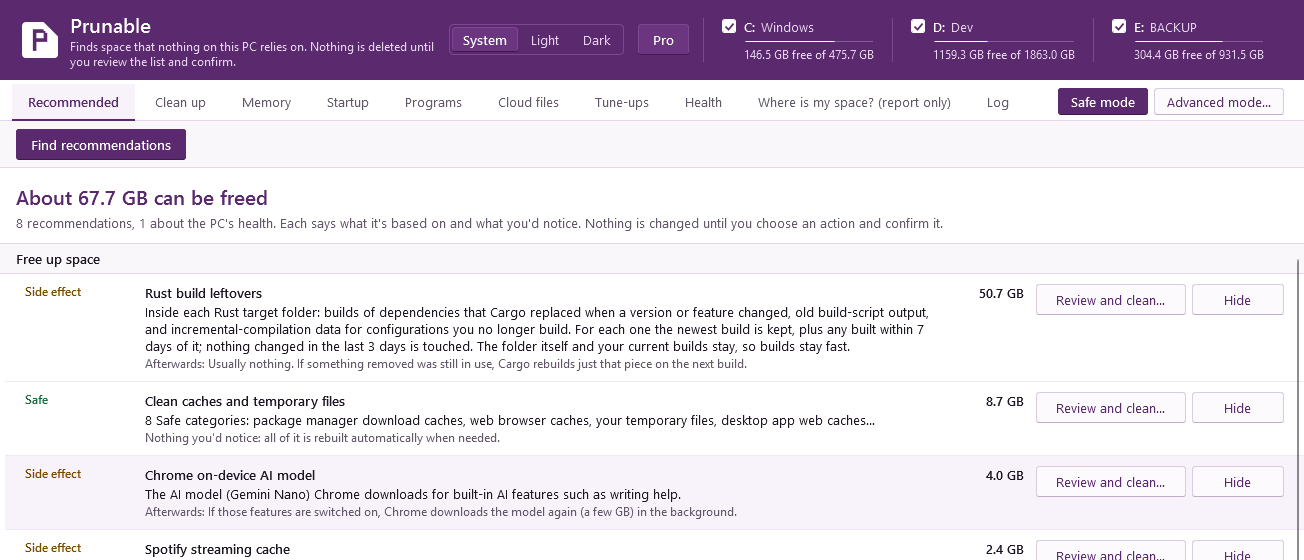
What it found on one PC
| Category | Kind | Size |
|---|---|---|
| Developer tools | ||
| Project build foldersProFolders your projects rebuild from scratch: Rust target, node_modules, Next.js .next, Python virtual environments, Unity Library, Godot .godot, Unreal Intermediate and Gradle .gradle. Your source code is never touched. | Ask first | 216.4 GB |
| Rust build leftoversProInside those Rust target folders: builds Cargo replaced when a version or feature changed. The newest build of each is kept, and nothing changed in the last 3 days is touched. | Side effect | 50.7 GB |
| Extra Rust toolchainsProRust compiler versions besides your default one and those pinned with rustup override. | Ask first | 3.9 GB |
| Package manager download cachesPackages npm, pip, uv, Yarn, Bun, Go, NuGet and others downloaded so the next install is faster. Installed packages and your projects are not touched. | Safe | 3.0 GB |
| Build dependency storesStores builds read from directly: NuGet packages, Cargo's crate registry, Gradle caches and the Maven repository. | Side effect | 896 MB |
| Browsers | ||
| Chrome on-device AI modelThe AI model (Gemini Nano) Chrome downloads for built-in AI features such as writing help. | Side effect | 4.0 GB |
| Web browser cachesCopies of pages, images and scripts saved to load sites faster. History, passwords, cookies, logins, bookmarks and extensions stay as they are. | Safe | 2.9 GB |
| Website offline cachesFiles service workers keep so sites and installed web apps open faster or offline. | Side effect | 1.1 GB |
| Apps and games | ||
| Spotify streaming cacheSongs Spotify cached while you streamed them. | Side effect | 2.4 GB |
| Desktop app web cachesThe browser caches apps like Discord, Notion, Spotify and VS Code each keep. Never their settings, logins or documents. | Safe | 879 MB |
| Old versions of auto-updating appsThe previous version apps like Discord and Slack keep after updating themselves. The newest is always kept. | Side effect | 450 MB |
| Steam caches and logsSteam's store page cache, old logs and crash dumps. Games and saves are not touched. | Safe | 427 MB |
| Graphics shader cachesPre-compiled shaders your graphics driver, DirectX and Steam keep for games. | Side effect | 11 MB |
| Windows and other | ||
| Your temporary filesFiles programs and installers left in your Temp folder. Only files older than 3 days are removed. | Safe | 1.5 GB |
| Old Claude Code conversationsProSaved Claude Code conversations untouched for 14 days. Each project's memory files are always kept. | Ask first | 87 MB |
| Thumbnail cachePreview images File Explorer saved for your photos and videos. | Safe | 34 MB |
| Leftovers of removed bloatwareProFolders left by known bloatware that is no longer installed. They go to the Recycle Bin. | Ask first | 30 MB |
| Crash dumps and error reportsDumps written when Windows or an app crashed, only useful for diagnosing that crash. | Safe | 16 MB |
| Claude app cachesThe Claude desktop app's web cache and old Claude Code logs. Conversations, settings and logins are not touched. | Safe | 2 MB |
| Old Windows component versionsRuns Windows' own cleanup tool, which removes component versions newer updates replaced. The size isn't known until it runs. | Side effect | varies |
Everything Prunable can clean, with where each one is kept on Windows.
Nothing goes until you confirm
Scanning deletes nothing. Prunable lists what it found, sizes each line, and says in two sentences what it is and what you'll notice once it's gone.
Only the Safe categories are ticked for you: things that rebuild themselves. Side-effect categories wait for you to tick them. Ask-first items are never selected; you choose each one.
Before anything goes you see the complete list and confirm it. Files in use are skipped. Start-up changes, registry backups and uninstall leftovers can be undone from one list. How Prunable stays safe
Free and Pro
The free edition cleans the Safe and side-effect categories in safe mode, for as long as you like. Pro adds the tools that need more care, and keeps the drive from filling up again.
- Project build folders and Rust trimmingBuild output of projects you haven't touched in months, and the Rust builds Cargo has replaced.
- Weekly maintenanceCleans the Safe categories once a week and warns you when a drive is nearly full.
- Cloud filesMakes synced files you haven't opened in months online-only, the way File Explorer's "Free up space" does, and shows which projects in Dropbox or OneDrive are syncing their node_modules.
- Leftovers after uninstallingFolders, settings and start-up entries a program's uninstaller left behind, backed up first.
- Several bloatware apps at onceRemove the preinstalled apps you never asked for in one go.
- Advanced modeThe Ask-first categories, services, Path repair, old drivers and .NET versions nothing uses. Each still asks first.
$29.99
once, for up to 3 PCs. No subscription.
- Try every Pro feature free for 7 days, from inside the app.
- Refunds within 14 days of buying.
- Move your license to a new PC whenever you like.
Download
Nothing else to install. Windows SmartScreen may warn about a new release: what to check.
- Version
- 1.0.0
- File
- Prunable-Setup-1.0.0.exe, 43.7 MB
- Runs on
- Windows 10 (1809 or later) and Windows 11, 64-bit
- Signed by
- Loophead Labs LLC
- SHA-256
- 593E0883ACE71DF52FDF4F3390AF9F9537B9130A384C340AA36CADE5040FE9AE